Groups:
Making groups in Z:SS is much more important than in many
other games due to the report messages. Sometimes the leadcam
won't report some attacks you're receiving or you'll be
too distracted to notice it. If you have a group formed
for every battle front, you'll immediately know what's happening
and where without losing focus on what you're doing. A female
computer voice will warn you with, say, "Group 6 under
attack". Double-hitting the 6 key will move you immediately
there. Thinking about it, where does that sexy female voice
comes from? Maybe the command center. Hmm.. that's probably
why, differently from Z, you can't invade the command center
in Z:SS. :)
Remote
building:
Learn to use construction groups to quickly put your structures
up as soon as your territories are set - and your economy
allow it. If you're used to TA or TA:Kingdoms like myself,
you'll probably try to set some c-robots to guard a single
one, and set this last one as your construction group. Don't!
Not always the "helper" ones will help in your
construction or repair order. It's actually much simpler,
simply select all c-robots and form the group. Whenever
you select the construction group, just hit [TAB] and select
the desired unit to build - all the units will help in its
construction. The reason why it couldn't be done this way
in TA is that as soon as more than one unit was selected
the building options wouldn't show up, while in Z:SS since
there are only c-robots in the group, their construction
options show up.
APC
colonization: As
you know, only robots can pick flags in Z:SS. What should
you do to grab flags using an APC, specially island flags?
Easy. Put at least one robot inside the APC. With it still
selected, click besides the desired flag. holding the SHIFT
key (queue orders), you'll notice the cursor changed from
move to unload.
Click right next to the flag. Forget about the APC and continue
playing. As soon as the APC gets close to the flag, it'll
unload its crew, which will automatically grab the flag
thanks to the Z:SS ai. No need to keep worried about when
it'll do it, since the game will warn you with the "territory
captured" sound message. To gain even mor e time, as
soon as you hear it simply click on its event message (you'll
see it written in the message window) and the viewport will
move to the captured flag. Select everything (no need to
deselect the APC), click on the APC to load everybody in
it and repeat the process.
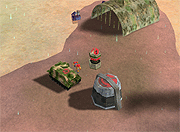
One
APC automatic unloads a robot which automatically capture
the flag. Cool :)
 Next:
Combat Techniques
Next:
Combat Techniques